
Name
Search


Data Opt Out
Removing Your Listing from SocialCatfish
SocialCatfish aggregates publicly available information from third party sources. Therefore, removing a listing from our directory will not remove your information from its original source and therefore your information might still appear on other directory sites. You may have multiple listings on SocialCatfish, each of which is identified by a unique URL and must be removed individually. Also, since we continually receive new and updated records, please regularly check SocialCatfish for additional listings that may appear.

Data Removal for Law Enforcement
At SocialCatfish.com, we are committed to supporting law enforcement professionals. To help facilitate your data removal request, we’ve created this dedicated form to ensure your information is handled promptly and efficiently. For faster processing, please include your government-issued email address, which will allow us to expedite your request.
Check out our Privacy Policy to learn more.

PLEASE NOTE
As names can have multiple variations, you must request removal of data from our website for EACH variation of a name. For example, if you are requesting to remove Jon Q Public from Atlanta, Georgia, please be aware that you must also request removal for Jonathan Q Public from Atlanta, Georgia and / or Jonathan Quinn Public from Atlanta, Georgia, and other variations – IF you find that we have such information on our website and that the information can be verified as pertaining to the person requesting the removal.
To remove a listing from SocialCatfish, please enter the URL of the profile and your email address (for verification purposes)
Opt Out Information Guide
-
Please find the profile you want removed.
-
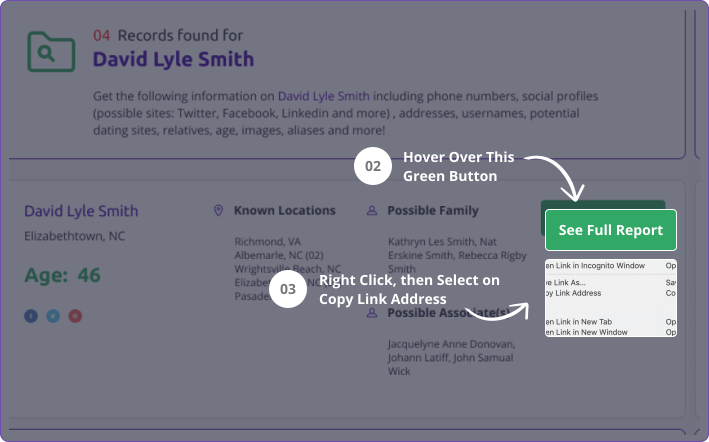
Hover over yellow "SEE FULL REPORT" button.
-
RIGHT CLICK on “SEE FULL REPORT” button then scroll down to "Copy link address".
-
Press and hold down on the “SEE FULL REPORT” button. Then you will see the option to "COPY" the link.
-
Once you get that link proceed to our "Opt Out" page here and follow the steps for removal.